
The Billing Owner role is specific to managing subscription and payment activities for Bocada Cloud. Only users with this role can view and manage the Subscription plan and payment information from the Administration > Your Subscription and Administration > Billing Report pages, as well as view the Your Subscription widget on the Dashboard. Users without a Billing Owner role will not see these items.
The individual who signed up and registered for Bocada Cloud on their own to create the account (was not added to Bocada Cloud by another user) will be automatically assigned as a Super Administrator and also given a Billing Owner role which can be re-assigned if needed. Note: there can be more than one user with a Billing Owner role.
Billing Owner only, or Billing Owner + Another Role
A user can be assigned the Billing Owner role by itself, such as a finance or accounting person who only handles payment-related activities. They will not be able to perform any other functions in Bocada Cloud such as add or edit a connection, view or manage reports, etc. They will only be able to see Subscription, Invoice and Payment information to perform tasks such as subscribe to a plan, add/edit a payment method, or view invoices.
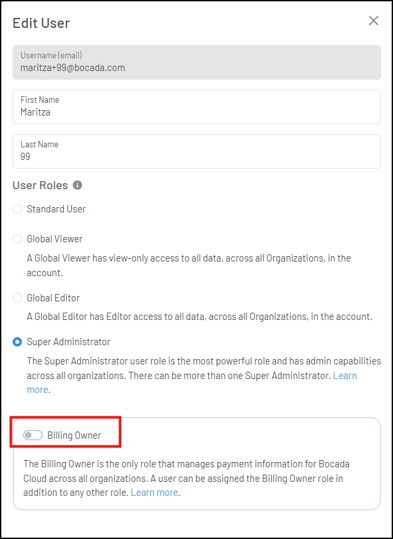
A user can also be assigned the Billing Owner role in addition to any one of the other roles in Bocada Cloud.
What Can the Billing Owner Do?
A user with a Billing Owner role can:
-
Make changes to the Bocada Cloud subscription and/or payment method
-
Automatically receive monthly invoices by email (for subscriptions paid by credit card).
-
They can also select additional users in their account to receive monthly invoices by email.
-
-
View past invoices (for subscriptions paid by credit card)
- View monthly charges in the Billing Report and on the Billing Dashboard (for subscriptions paid by credit card or a Marketplace account)
Step-by-Step Instructions to Assign a Billing Owner
1 - A user with a Super Administrator role starts by logging into Bocada Cloud
2 - On the left navigation menu, hover over Administration and then click Users.
Assign a Billing Owner role to an existing user
3 - On the row of the user you want to edit, click the pencil icon on the far right

4 - You will see the right-side panel display. To add the Billing Owner role, click the toggle next to "Billing Owner" and then click the Save button at the bottom of the screen.
Assign a Billing Owner role to a new user
5 - On the Users list page, add a new user by clicking the + icon on the top right, next to the search field

6 - Enter the user's email address, first and last name. Then, select what role or roles you want to assign them. You can assign the Billing Owner role only, or it can be assigned in addition to another role. Then click the Save button. The user you added will receive an email invitation to complete the creation of their Bocada Cloud login credentials.

If you have questions about the Billing Owner role, or issues creating or modifying a user's role after trying these steps, create a Support Ticket in Bocada Cloud, or contact us.